What Is a Digital Envelope System?
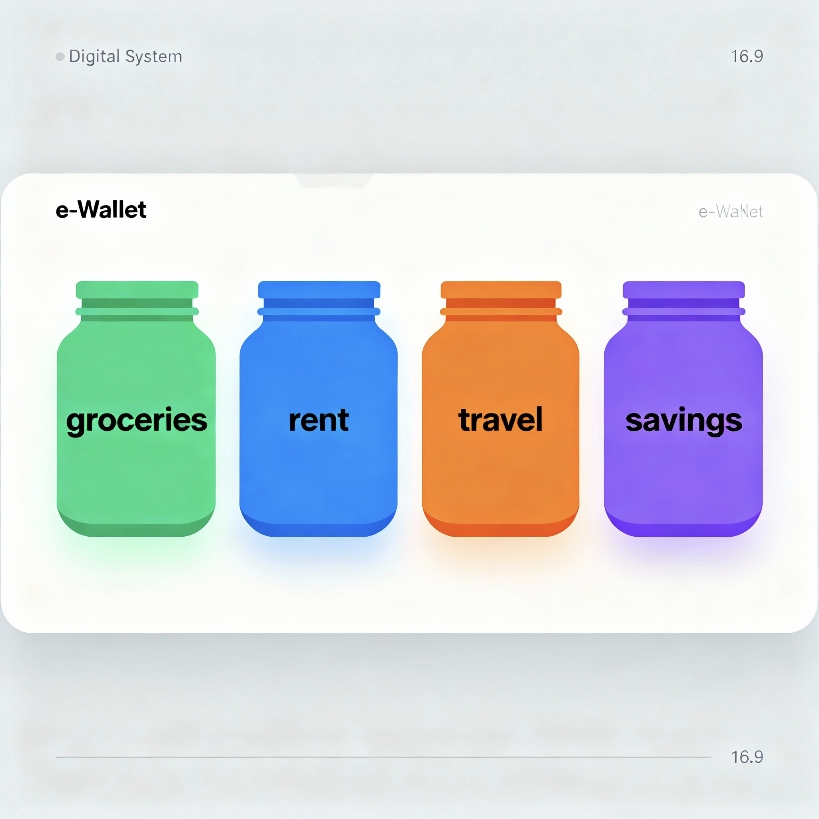
The digital envelope system is a modern take on the classic cash-envelope method, where you allocate money into category “envelopes” like groceries, rent, travel, and emergencies—except now it’s virtual and powered by e‑wallets and banking apps. Instead of physical cash, you use sub-accounts, vaults, or jars to segment funds and track spending per category. This approach keeps your budget visible in real time while maintaining the convenience and safety of cashless payments.
Why Use E‑Wallets for Envelopes?
E‑wallets and digital banks offer features that map perfectly to envelope budgeting: named sub-accounts, instant transfers, spending limits, and automated rules. They also provide searchable histories, alerts, and category tagging, which make audits and monthly reviews far simpler than with cash. Most important, they enable automatic funding of envelopes on payday, which removes friction and improves consistency.
Core Components You’ll Need
- Primary e‑wallet or digital bank that supports multiple sub-accounts, spaces, or “jars”.
- Automatic transfers or scheduled rules to fund envelopes on payday or weekly.
- Category tagging and notes to label transactions per envelope.
- Spending controls such as per‑card limits, virtual cards, or merchant locks.
- Exportable statements or CSVs for month‑end reconciliation in a spreadsheet.
Step‑by‑Step Setup
1) Map Your Categories
Start with essentials (rent, utilities, groceries, transport), flex categories (dining, shopping, entertainment), and sinking funds (medical, car maintenance, travel, annual fees). Keep the list lean—8 to 12 envelopes is manageable and comprehensive for most households. Add a “Buffer” envelope to catch irregularities without breaking your plan.
2) Create Sub‑Accounts or Jars
For each category, create a dedicated jar or space with a clear name and a short description. Where available, assign an icon or color to make envelopes easily identifiable. If your provider limits the number of sub-accounts, group smaller categories into a shared “Discretionary” envelope and track sub-lines in your notes.
3) Set Target Amounts
Use your past 2–3 months of spending to benchmark target allocations for each envelope. For sinking funds, divide the annual cost by 12 and fund monthly (e.g., car service estimated at $600/year becomes $50/month). Document targets and due dates inside each envelope’s description.
4) Automate Funding on Payday
Create scheduled transfers that split your income across envelopes the moment your paycheck arrives. Prioritize fixed needs, then sinking funds, then wants. If your provider supports percentage-based rules, allocate by percentage; otherwise, set fixed amounts and adjust quarterly as your income changes.
5) Connect Cards to Envelopes
If your e‑wallet supports multiple virtual cards, link a card to specific envelopes for category‑pure spending (e.g., a “Groceries” card tied to that jar). Where this isn’t supported, keep a single card but transfer funds from the right envelope to your spendable balance before purchases to avoid cross‑contamination.
6) Set Alerts and Limits
Turn on low‑balance alerts per envelope and weekly summaries for spending. If available, set merchant category code (MCC) limits, per‑transaction ceilings, or daily caps to prevent overspending. These gentle constraints protect the plan without needing constant willpower.
7) Reconcile Weekly, Review Monthly
Do a 10‑minute weekly check: confirm transactions are tagged correctly and top‑up critical envelopes if needed. At month‑end, export a statement or CSV and compare against your targets. Roll over unused balances in needs and sinking funds; consider sweeping leftover wants into savings or investments.
Example Envelope Blueprint
- Housing: Rent, HOA, utilities.
- Food: Groceries, dining out.
- Transport: Fuel, rideshare, maintenance.
- Health: Prescriptions, checkups.
- Essentials: Phone, internet, insurance premiums.
- Sinking Funds: Car service, gifts, travel, education, annual subscriptions.
- Debt Payments: Credit cards, loans.
- Investing: Brokerage or retirement contributions.
- Emergency Fund: Separate high‑yield account linked to your e‑wallet.
- Buffer: Catch‑all for irregular variance.
Advanced Tactics
Use Rules and Workflows
Where supported, create if‑this‑then‑that rules: when salary hits, move set amounts to envelopes; when grocery spend exceeds 80% mid‑month, send alert; when travel jar reaches goal, freeze additional contributions. Automations eliminate manual effort and ensure your plan executes even on busy weeks.
Virtual Cards for Categories
Issue distinct virtual cards for high‑traffic categories like groceries and fuel. Label the cards and keep them in your mobile wallet with clear nicknames. If a card is compromised, you can instantly freeze just that category without affecting the rest of your budgeting system.
Rollover vs. Reset Rules
Choose whether unused funds carry over. Needs and sinking funds should roll over to build toward upcoming expenses. Wants (like dining and entertainment) can reset monthly to curb creep; any surplus can be swept into savings or investments to accelerate goals.
Shared Budgets and Permissions
For couples or households, create shared envelopes and assign viewing or spending permissions. Use shared notes to log special purchases or changes. A monthly 15‑minute money check‑in reinforces transparency and accountability.
Common Pitfalls and Fixes
- Too Many Envelopes: Consolidate to 8–12; detail sub-items in notes to avoid complexity.
- No Buffer: Add a small catch‑all to handle odd expenses without raiding core categories.
- Underfunding Sinking Funds: List annual costs and automate contributions so big bills never surprise you.
- Ignoring Alerts: Set meaningful thresholds and act when you’re at 80% of a category.
- “Swipe and Forget”: Require yourself to transfer from the correct envelope before spending.
Security and Privacy Best Practices
- Enable strong authentication: Passkeys or app‑based 2FA beats SMS when supported.
- Lock down devices: Biometric unlock, auto‑lock timers, and encrypted backups.
- Use distinct virtual cards for risky merchants and subscriptions; auto‑expire trial cards.
- Review connected apps and API access quarterly; revoke unused connections.
- Monitor notifications for unusual activity; freeze cards instantly if anything seems off.
Integrations and Tooling Ideas
Pair your e‑wallet with a spreadsheet or budgeting app to visualize progress and forecast cash flow. If available, connect to savings vaults offering higher yields for long‑term envelopes like emergency funds and taxes. For investing envelopes, automate transfers to a brokerage on a set cadence, keeping short‑term envelopes in cash to avoid market risk.
When to Adjust Your Categories
Review categories whenever your income changes, you add a new recurring bill, or you consistently overspend or underspend a line for two consecutive months. Adjust targets by 5–10% rather than overhauling the whole system so you can isolate what’s working. Major life events—moving, job change, new family member—justify a full recalibration.
Getting Started in 30 Minutes
- List 8–12 envelopes with targets and due dates.
- Create jars/sub‑accounts and nickname them clearly.
- Turn on payday automations and low‑balance alerts.
- Issue 1–3 virtual cards for high‑spend categories.
- Schedule a weekly 10‑minute reconciliation and a monthly review.
By the end of one pay cycle, you’ll see exactly where money flows, which categories need calibration, and how much closer you are to your savings goals. The visibility alone often reduces overspending and anxiety.
Final Thoughts
A digital envelope system aligns your day‑to‑day spending with your long‑term priorities, transforming good intentions into consistent action. With clear categories, automation, and simple guardrails, your e‑wallet becomes a proactive money manager—not just a place to store cash. Start small, keep it simple, and let automation carry the routine while you focus on the goals that matter.